

This ADA issue is one of the Level AA issues you might encounter in your Monsido reports, that can be extremely confusing at first. What does it mean? Does it mean that the alt-text is short and needs to be longer?
Actually that is not how to read the Monsido issues. What it is really saying is that the image alt-text must be short and that the current alt-text may be a bit too long or perhaps the alt text is not as short as possible. Okay, what does ‘not as short as possible’ mean? If someone attempts to add a long sentence or even several sentences to the alt-text, it may get flagged as possible longer than it needs to be.
Still confused? Let’s take a look at a few examples.
In the following figure, you can see that the alt-text associated with the image is essentially the same as the paragraph that came before it.
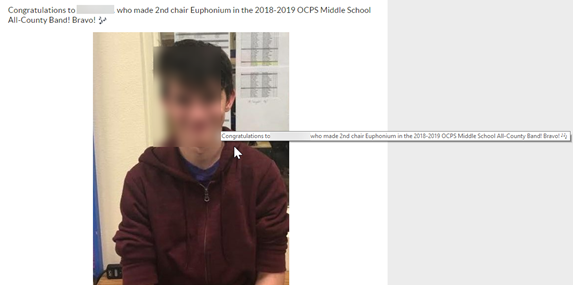
Strictly speaking, this text does not describe the image. Alt-text should describe the image, not the entire story behind the image. Perhaps better alt-text might be shortened to: “Photo of xxxxx named to 2nd chair Euphonium in All-County Band” or even, “Photo of xxxx”. This is sufficient because the text before the photo tells the rest of the story.
Another good example (or maybe I should say bad example) of long text is this one:

Here the alt-text goes into far more detail than necessary repeating information that appears directly above this image, but is not part of the image. Alt-text is supposed to describe the image which is this case is: “Valencia Collage logo”. Nothing more. Now the interesting thing about this example is that the tag line: “Learn More” with an arrow implies that you can click on it to learn more. But you cannot click on this image. There is no hyperlink here. Oops?
Another example found on the same page is this one for CLEP Testing. Note that alt-text says to click here, but again this is just an image, not a link. You go nowhere when you try to click on it. Frustrating!
Let’s go extreme. The following image has a lot of text that blind people need an alternate way of discovering. However, the alt-text is so long that it would be like reading a separate page:
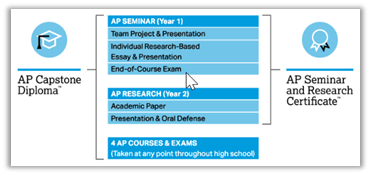
Here is what the alt-text actually says:
The graphic consists of a vertical column with multiple rows of text. The column is broken into three main sections. The top section has the heading AP Seminar open parenthesis Year 1 close parenthesis. Under this heading are three rows of text, as follows: Team Project and Presentation; Individual Research-Based Essay and Presentation; and End of Course Exam. The middle section has the heading AP Research open parenthesis year 2 close parenthesis. Under this heading are two rows of text as follows: Academic Paper and Presentation and Oral Defense. The bottom section consists of the heading 4 AP Courses and Exams. Underneath the heading is the following text: open parenthesis Taken at any point throughout high school close parenthesis. Along the left side of the vertical column is a bracket labeled AP Capstone Diploma. The bracket includes all three sections of the vertical column. Along the right side of the column is a bracket labeled AP Seminar and Research Certificate. This bracket includes only the AP Seminar and AP Research sections of the column.
Yeah, that is a bit too long. Remember blind visitors with screen readers would hear that complete text every time they passed over that image. What should be done in this case, and in all cases where the image contains a large amount of text, is to include a link close to the image [above, below, to the side] that when clicked displays the full text/description of the image. The link alt-text in that case could say something like, “Click here to open a new widow with an accessible version of the [above/below] image”. The link text might be: Accessible Version of AP Capstone Diploma Image
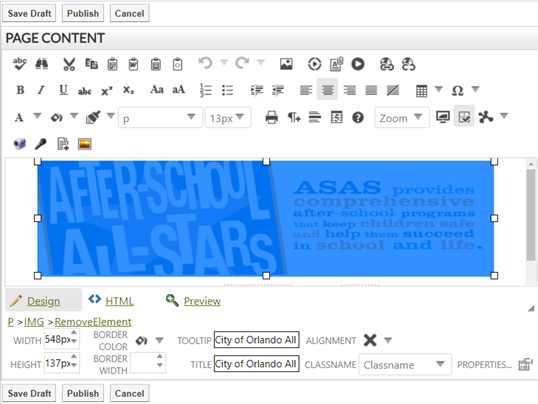
On a related topic, what if you have an image that has an alt tag with text, but no title tag with text? That was actually the case of the above image and why hovering over the image did not show any alt-text even though the alt-text field was filled in. Well, blind users may hear the alt-text read to them, but sighted people do not see that alt-text. Do you want everyone to see the same information? If so, duplicate the Alt-text into the Title property of the image. The following image shows a portion of a page that has an image selected. Notice the image properties shown in the lower portion of the image. What we call alt-text appears in the Tooltip box and is the text read to blind visitors to the site. Title text is what sighted people see when they hover a mouse over the image. To provide the same information to both kinds of visitors, you must duplicate that alt-text in the title field as shown.
Okay. Next time I will take a deep dive into one of the other Accessibility Issue messages.