

The Issue
One issue that seems to be repeated across many pages of the Internet, intranet, and even school sites is the use of white text on a background of orange as shown in the image below. However, even though you may not have color blindness issues, people who do may find this combination difficult to see. Using the recommended Colour Contrast Analyser you can see that even for normal vision, the contrast between orange and white is only 2.2:1. (No, it does not matter which color you select as the text and which you select as the background, color contrast is only based on the difference between the two colors.)
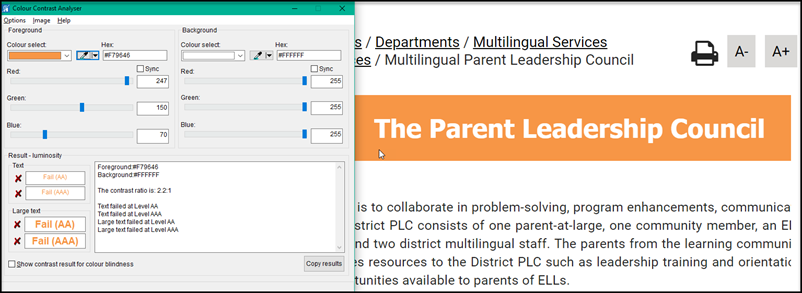
What are the ADA rules for color contrast? The contrast must be at least 3:1 or greater for 18 pt (24 px) text or 14 pt (18.5 px) bold text or greater. All other text must have a contrast of 4.5:1. While there is no argument that the font size shown here is greater than 14pt bold, it still does not meet or exceed the 3:1 lower limit for contrast.
The contrast ratio is even worse if you look at the contrast as seen by people with different color blindness as shown in this figure which comes from the same tool.
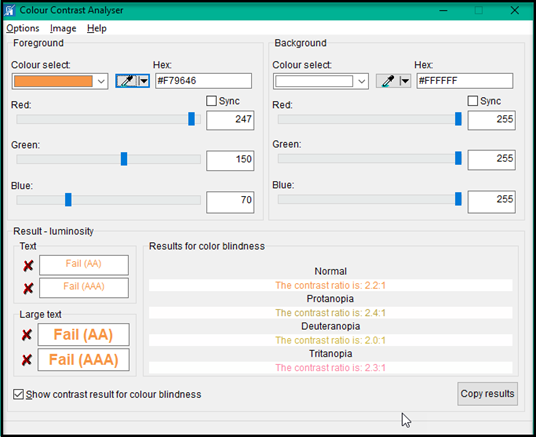
People with Deuteranopia see this color contrast ratio as only 2.0:1.
Protanopia: Red-Green color blindness relates to a person’s sensitivity to red or green light.
Deuteranopia: A variation of red-green color blindness is the most common form and afflicts 6% of males
Tritanopia: Blue-Yellow color blindness that causes a person to confuse blue with green and yellow with violet.
Colour Contrast Analyser is a free utility that can be downloaded from: https://developer.paciellogroup.com/resources/contrastanalyser/
If you are a web editor for your department or school site, please download and start using this free tool to make sure the contrast between your font color and background color meet or exceed the recommended ratios defined above.
Another common color contrast failure is red text on a white background for links on some our school websites that have red as one of their school colors:
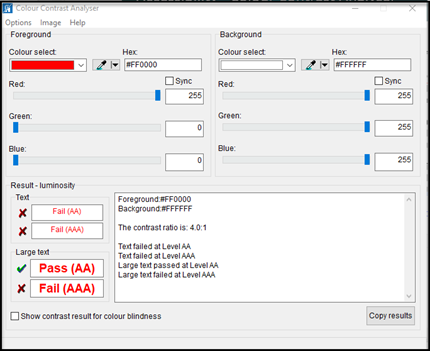
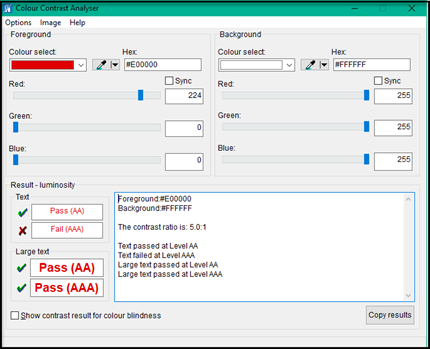
However, changing the shade of red from a value of 255 to 224 will pass the level AA test for smaller fonts which are used in links.
The Bottom Line
This color combination, even though we are in Orange County, cannot be used on web page (or even printed documents). You could go with a darker orange even orange text on a black banner (contrast of 9.4:1), but white on orange or orange on white cannot be allowed. Please check your website pages and make necessary corrections to this and any other color combinations that may fail the colour contrast test.