

How to Replace Header Tags Used only for Formatting
NOTE: HEADING 1 (h1) should never be used in OCPS content pages because the page name itself is assigned to HEADING 1 and there can only one instance of HEADING1 on a page)
In a prior post, I covered the accessibility issue of not using header tags to simply format text. Header tags should only be used to define sections of text. Screen Readers treat headers as a table of contents that it can read to the visually challenged so they can quickly determine where in a content area they can find the information they want without having to listen to the entire document being read to them. The natural question then is if headers cannot be used to format text, especially in short content areas for which true headers would be over-kill, what should the web author use? First off, all paragraphs, even single lines should begin with a paragraph tag. Then using a combination of font size settings and the tag for bold text, you can generate the same visual effect as using the header tags. The following figure shows an example of this:
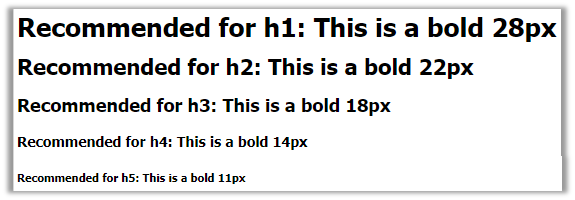
And to prove that this was not done with header tags, here is the code:
<p><span style=”font-size: 26px;”><strong>Recommended for h1: This is a bold 28px</strong></span> </p>
<p></p>
<p><span style=”font-size: 22px;”><strong>Recommended for h2: This is a bold 22px</strong></span> </p>
<p></p>
<p><span style=”font-size: 18px;”><strong>Recommended for h3: This is a bold 18px</strong></span> </p>
<p></p>
<p><span style=”font-size: 14px;”><strong>Recommended for h4: This is a bold 14px</strong></span> </p>
<p></p>
<p><span style=”font-size: 11px;”><strong>Recommended for h5: This is a bold 11px</strong></span> </p>
Note that by using this type of formatting of text, you can create “visual headers” for pages and sections of pages without having to be concerned about the hierarchy requirements of regular header tags which must follow these rules:
<h1> can only be followed by <h1> or <h2>
<h2> can only be followed by <h1>, <h2> or <h3>
<h3> can only be followed by <h1>, <h2>, <h3> or <h4>
<h4> can only be followed by <h1>, <h2>, <h3>, <h4> or <h5>
<h5> can only be followed by <h1>, <h2>, <h3>, <h4>, <h5> or <h6>
<h6> can only be followed by <h1>, <h2>, <h3>, <h4>, <h5>, <h6>
You cannot jump into the middle of the hierarchy.
How These Errors Appear in Your Accessibility Report:
If you see any of the following errors in your Accessibility report section, it probably means that you have one or more of the above heading misuse errors.
All h1 elements are not used for formatting – Section 2.4.6 of the WCAG
All h2 elements are not used for formatting – Section 2.4.6 of the WCAG
All h3 elements are not used for formatting – Section 2.4.6 of the WCAG
All h4 elements are not used for formatting – Section 2.4.6 of the WCAG
All h5 elements are not used for formatting – Section 2.4.6 of the WCAG
All h6 elements are not used for formatting – Section 2.4.6 of the WCAG
The header following an h1 is h1 or h2 – Section 2.4.6 of the WCAG
The heading following an h2 is h1, h2 or h3 – Section 2.4.6 of the WCAG
The heading following an h3 is h1, h2, h3 or h4 – Section 2.4.6 of the WCAG
The heading following an h4 is h1, h2, h3, h4 or h5 – Section 2.4.6 of the WCAG
The heading following an h5 is h1, h2, h3, h4, h5, or h6 – Section 2.4.6 of the WCAG
Other related errors are:
List items must not be used to format text – Section 3.2.4 of the WCAG
This error often occurs when a list has only a single item and should instead be formatted as a paragraph
All p elements are not used as headers – Section 1.3.1 of the WCAG
This error creates a bit of a conundrum because it asks you to look if there are other presentational elements (<strong>, <span>, <em>, etc) within the paragraph element) then it should be a header instead. This would seem to not apply when it is just a couple of words that are modified by <strong> or <em> or <span>, but rather when then entire text string between the <p> and </p> is being modified. However, the usefulness of headers just to format text in a small content area and thus forcing large fonts that may look out of place presents a challenge to the page designer. (Strictly speaking, the examples above probably would be headers, but remember that if you use headers, there is a hierarchy.)