

On the upper right side of your school web site is a section entitled Upcoming Events. It uses a portlet named Upcoming Events (no surprise there) that has been configured to look at your school calendar and pulls events from your school calendar to highlight on your home page. This information does not only appear on your school’s home page. It is also used by the district’s mobile app when users of the mobile app subscribe to your school and perhaps other schools. The mobile app combines the upcoming events from the district along with the selected schools to provide the user with a consolidated view of events they may find interesting. If you do not populate your school calendar or you do not use the Upcoming Events portlet, mobile app users might think that nothing at all is happening at your school. So how should it be used?
The Upcoming Events portlet has the following settings:
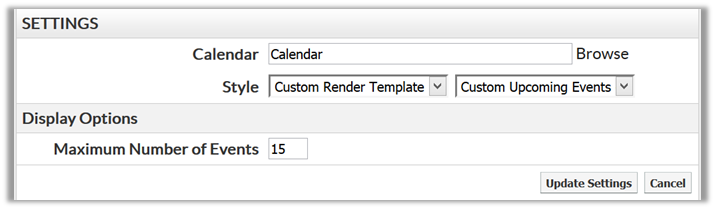
Of these settings, you should not change the first three. However, you can change the number of events that the portlet pulls from the calendar starting from the current day. The interesting thing about the way this portlet works is that no matter how many events to which you set the maximum, the portlet only visually shows 4 events on the home page due to restrictions on the size of the area in which the portlet has been placed and the space allocated for each event. The portlet does not control the number of days of events, but rather the number of events. If you specify a maximum of 5 events, then it will not matter if those 5 events all occur within the next week or if they are spread out over the next three months. However, when you request more than 4 events (like the 15 in the image above), the portlet displays forward and backward arrows at the bottom right of the portlet that allows the viewer to ‘scroll’ through the retrieved events 4 at a time. You can also jump to the complete school calendar by clicking on the Full Calendar link in the lower left corner of the portlet.
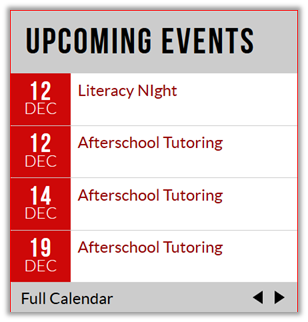
How many events should you retrieve from your calendar? There is no absolute answer. Elementary schools general have few calendar events than high schools. Therefore, elementary schools might need to pull fewer events than a high school to have a comparable number of weeks of events displayed in Upcoming Events. So what is a good Rule of Thumb? At the very least, Upcoming Events should show 2-4 weeks of events and you many need to ‘adjust’ the number of events you are including in Upcoming Events to be in this range.
On the other hand, your full school calendar should include upcoming events for at least two months no matter what size your school is. Major events such as holidays, quarter start and end dates, major testing periods, etc. should be posted to your calendar as soon as they are known for the entire school year.
If you follow these simple rules, you will have a successful Upcoming events portlet on your school site.