

Last time, I looked at the Level A accessibility errors related to links. This time, I am moving up to the Level AA link issues. To be compliant at the AA level of WCAG, you must first be compliant at the A level. So what does Level AA add to link compliance? Color Contrast.
Before reading this blog post, please read the following blog post and download the Colour Contrast Analyzer to help you check your link colors.
- https://wordpress.ocps.net/presenceblog/monsido-and-how-to-fix-broken-links/
- https://wordpress.ocps.net/presenceblog/do-users-really-want-to-see-the-url-of-your-hyperlinks/
- https://wordpress.ocps.net/presenceblog/quick-tip-you-need-to-do-more-than-just-say-click-here/
- https://wordpress.ocps.net/presenceblog/hyperlink-colors-part-2/
- Colour Contrast Analyzer: https://developer.paciellogroup.com/resources/contrastanalyser/
Level AA Link Errors:
There is only 1 severe error for links at this level:
Link text colour must contrast sufficiently with its background color
Normally, this would be an easy guideline to meet. For the district as well as for the school sites, we have defined link colors that should provide a good contrast ratio with the background. A problem may occur if you copy and paste content from another source without using the Paste Plain Text option that removes format settings including color from your web page.
The Monsido Help Center states the color contrast rule as:
The visual presentation of link text must have a contrast ratio of at least 4.5:1, except for large-scale text, which must have a contrast ratio of at least 3:1 as determined by a contrast algorithm specified by WCAG2.0. Large scale text is considered to be at least 18-point (or 14 point when bold).
The simple solution is to remove any color attributes from your HTML since each site, include school sites, and use only the predefined link colors that should already be ADA compliant. Then use the Colour Contrast Analyzer tool to check the text color compared to the background. The following example comes from a district page:

This results in a gray text with a 4.4:1 color contrast ratio to the white background. However, a true black text is 21:1. Simply remove the color references in the ‘style’ attribute as shown here.

Level AA Link Reviews:
There is only 3 reviews for links at this level: that I am going to treat together:
Visited link text colour must contrast sufficient with its background colour.
Active link text colour must contrast sufficient with its background colour.
Selected link text colour must contrast sufficient with its background colour.
I am going to repeat the advice from the above error comment. Perform these checks:
- Remove any color coding in the HTML for the links that either you added or were carried over from the source from which the text was copied.
- Use the Colour Contrast Analyzer to verify that the current colors meet the color contrast rules.
If you did not overwrite the default link colors and still see these errors in your report, I am going to suggest the following:
You did nothing wrong!
The fact is, I have checked many instances of text and link colors and there seems to be a problem with the way the characters are displayed at smaller font sizes. When I captured a section of the text and expanded it, I could see the individual pixels used to create the text.
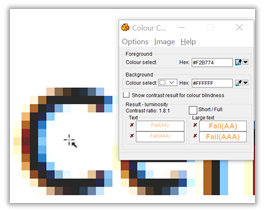
This is in part the way browsers ‘smooth’ out the character shapes at smaller font sizes. Some fonts are more affected than others are. The bottom line is that this issue cannot be totally eliminated and is one of the reasons for sticking with sans-serif style fonts alike Ariel, Calibri, and others.
If your content did not use the color attribute to modify the color of the link text or regular text and your report still says you have a color contrast issue, notify presence@ocps.net. Do not attempt to ‘find’ colors that work on your website. We will either verify that your page is correct or that we need to have SchoolMessenger modify the CSS that drives your pages to use a different color.