

This is a quick post specifically for school of a change being made to your sites (some sites are completed, but others will be completed next week).
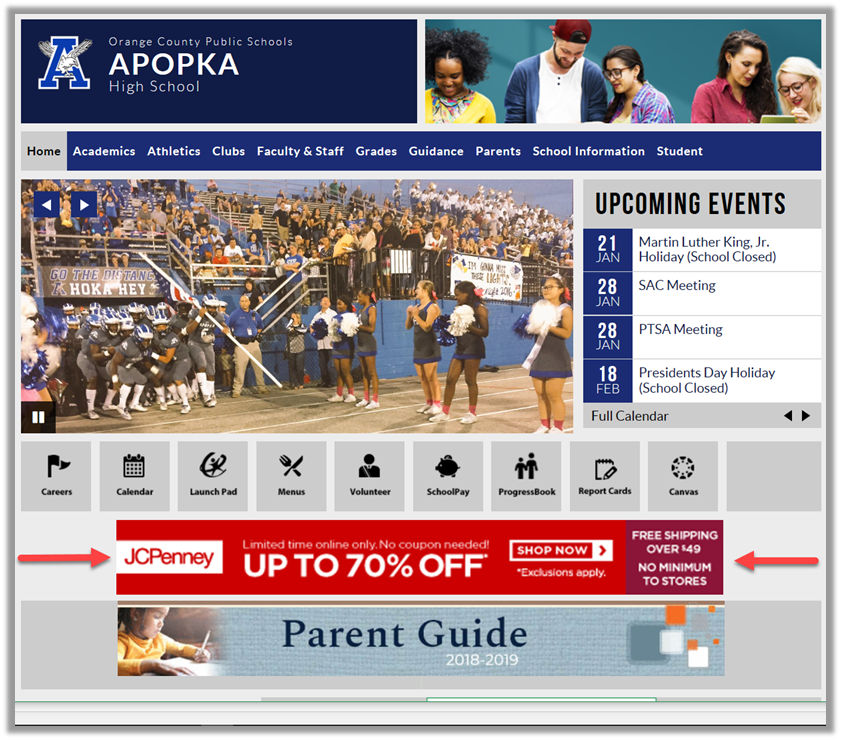
Item 1: The district has added a second advertising line using a new advertising rotating banner from our new advertising party. It appears directly below the Quick Links. This banner rotates much like the digital billboard signs that have now taken over our roadways. The advantage is that more advertisers can participate in this program by buying a percentage of the total page display time. OCPS benefits by receiving a small amount each time a vendor’s ad appears and an additional amount if someone clicks the ad and actually buys something from the site. Currently, the vendors are large nation-wide vendors. However, there is a provision for us to see local ad time slots in the future if the trial period is successful. This web part should only be edited by the district’s web support staff. If you do not currently see this web part on your school’s home page, give us until January 22nd to update all school sites.
Item 2: The district is currently in the process of trying to make all our sites more ADA (accessible) compliant. To that end, the use of the Header 1 through Header 6 styles should only be used to define content sections in web pages and PDF documents. They should not be used to merely format text as has been done in the past. Because of that change, the font size dropdown has been added to the edit tools found in the edit toolbar of content web parts as shown below:
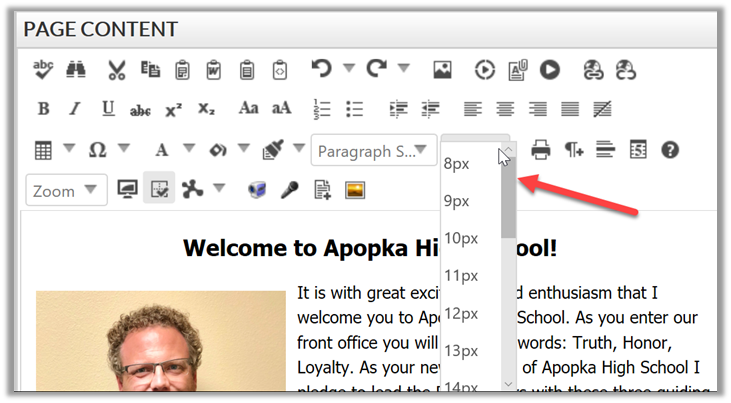
The default font size for text should be 13 px. However, we will accept anything from 12px to 14px. Making the normal font size smaller would make it hard to read. Normal titles such as the one shown in the image above should be between 18px and 20px. Anything larger than that can be reduced in size by the district support staff when found.
Note that in the edit toolbar, you have the style options: Bold, Italic and Underline. We would like to discourage the use of underline except for hyperlinks. However, we should all default to the formatting (color, size, style, etc.) as defined by the system for hyperlinks and not try to override that formatting. The default hyperlink colors were chosen to provide adequate color contrast between normal text and the text background for all links. Overriding the hyperlink default format could result in your school being held responsible for any accessibility claims on your site.
Item 3: We hope to send before the end of the month to all editors a one page summary of the major Accessibility guidelines you must follow in all of your work for the web site, online PDF files, and in many cases any other printed materials. Almost all of these guidelines have already been discussed in this blog over the last several months. More will be coming in the future.
Keep watching this blog posts for further news.