

This blog is primarily oriented to school sites but even non school site admins and authors can perhaps learn something about using External Links.
We have spot checked school sites and determined that while many have pointed their links for the Student Code of Conduct and the Parent Guide pages to a district managed page at: (https://www.ocps.net/departments/marketing_and_events/publications/code_of_student_conduct_and_parent_guide/). One advantage of this page is that it links to each of these documents in 6 different languages: English, Spanish, Haitian-Creole, Portuguese, Vietnamese, and Arabic. Also, this page will always point to the most recent edition of these documents. In fact, if you direct the links for your school’s Student Code of Conduct and Parent Guide to this page, you will never have to change the link again, even in future years, as long as these documents are still used. Unfortunately, we have found many school sites that do not point to this district managed page. Often they only include the English version of these documents and occasionally, these even point to versions of these documents from prior years.
The solution is that if you have the Student’s Code of Conduct and Parent Guide links in one or more of the dropdown menus of your school site’s main menu bar, they should point to the page link shown above. You should never link from the main menu to a separate page which has nothing on it but a link to a document or page somewhere else. In other words, reduce the number of click necessary to get to the information. Always use the External Link Page type in dropdown menus to link to documents or other pages either within your site or to an external site.
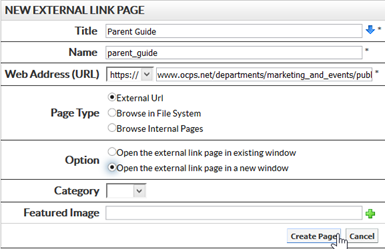
Under Page Type, use External URL to reference pages outside of your site such as the Student Code of Conduct or Parent Guide page as shown in the image above. Remember to open links to documents and pages external to your site in a new window (the Option section of this dialog). Double check that you do not use https:// in the first dropdown list of the Web Address section as well as in the full URL. If you select https:// in the Web Address dropdown, begin the URL with: www.ocps.net/…