

A common occurrence is to have a hyperlink that uses an image rather than Link Text. In these situations, the alt text for the image and link must appear in the <img> tag’s ‘alt’ attribute. There are many cases where this has been left blank or as an empty string. Even if the image may appear to be decoration, that fact that clicking on the image causes the hyperlink in which the image is embedded to go to another page or site requires that the alt text describe the link destination. A typical example is shown in the following image.
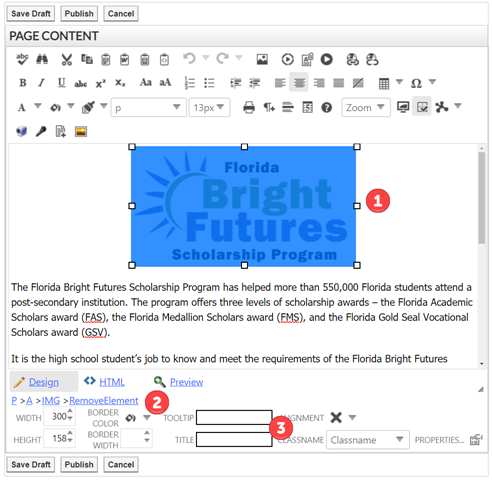
When you edit a content portlet and select an image from that page (as shown by the red circle with a ‘1’ in it), the image is highlighted and image properties appears at the bottom of the edit dialog box. The first line of the properties (red circle with a ‘2’ in it) shows the hierarchy of tags which surround the image. As you can see in the figure above, the anchor tag (hyperlink) has an image tag (IMG) inside of it. You can also see that the Tooltip and Title of the image are empty. You must enter text in the Tooltip and Title field (It can be the same text) that describes what happens when you click on the image. For the above example, appropriate text might be: Go to the Florida Bright Futures Scholarship Program website as shown in the following figure.

At this point, you can publish the page.