

The new Monsido Accessibility reports break down errors into three major categories:
- Quality Assurance – Includes broken links and misspellings.
- Accessibility – These are the common ADA issues.
- SEO (Search Engine Optimization) – These issues affect the overall performance of the pages
This post focuses on the Accessibility area only. There are 164 individual accessibility checks performed on each page (web page, calendar event, PDF, Word Document, Excel Document). Of these, 132 are Level A compliance issues and 32 are Level AA compliance. Level A are considered basic issues. Level AA are considered intermediate issues. To be compliant at Level AA, you must be compliant at Level A. There is also a Level AAA. We will not address that level at this time, as it is generally not included in audits.
Level A – Accessibility Errors (35):
Of the Level A issues, we have pages that fail 90 of the 132 checks. However, I have reviewed these errors and have listed below 35 issues that I believe may be generating false positive results and have asked SchoolMessenger to check on them. This does not mean that you do not have these errors in the content you manage. Rather it means that the issue may reside in the SchoolMessenger code behind the page. However, because these errors typically occur on all or nearly all similar pages, for now I am asking you to address these issues only to the extent I describe in the following text. You should examine and resolve all other Level A issues not listed here.
Level A – General Errors
The following accessibility errors are general page errors that seem to appear on every (or nearly every page).
-
Title attribute for all img elements is absent or the empty string (”) if the image is decorative (17,531 pages).
You can skip this error if:
- You see this error on a page that has no OCPS supplied image elements.
- You have checked the OCPS supplied images on the referenced page and all have Title (alt-text) content that is meaningful.
-
Alt text for all img elements that are not used as source anchors conveys the same information as the image. (17,531 pages).
You can skip this error if:
- You see this error on a page that has no OCPS supplied image elements.
- You have checked the OCPS supplied images on the referenced page and all have Title (alt-text) content that is meaningful and conveys the same information as in the image especially if the image contains text.
-
Id attributes must be unique (17,195 pages).
For now, ignore this error until we get further clarification.
-
Use of colgroup and col elements to group columns (1,954 pages).
You should not group columns (merge of cells).
-
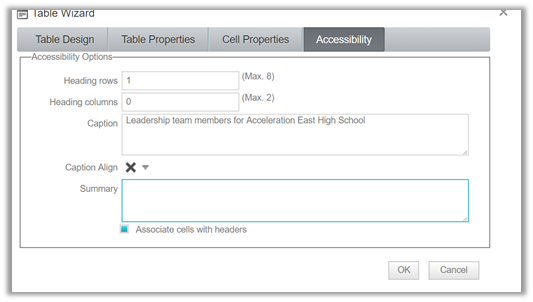
All complex data tables have a Summary (1,947 pages).
This primarily refers to tables within tables and tables with a large quantity of text with many columns and or rows.
-
Use thead to group repeated table headers, tfoot for repeated table footers and tbody for other groups of rows (1,954 pages).
A table should have no more than 1 header row and one footer row.
-
Each source anchor contains text (3,683 pages).
Anchor tags (hyperlinks) must enclose other text that is displayed on the page or an image. See my blog post about phantom links.
-
All groups of links with a related purpose are marked (17,548 pages).
Ignore this error for now until I get clarification as to why this is on all the pages.
-
All text references do not use shape, size, or relative position alone (17,548 pages)
Ignore this error for now until I get clarification as to why this is on all the pages.
-
Unicode right-to-left marks or left-to-right marks are used whenever the HTML bidirectional algorithm produces undesirable results (17,548 pages).
Seems to affect most if not all pages. Unless you have specifically change the HTML direction for reading your content such as for arabic, ignore this error.
-
All changes in text direction are marked using the dir attribute (17,548 pages).
Seems to affect most if not all pages. Unless you have specifically change the HTML direction for reading your content, ignore this error.
-
A skip to content link appears on all pages with blocks of material prior to the main document (17,538 pages).
Ignore this error for now until I get clarification as to why this is on all the pages.
Otherwise, enter ‘Decorative’ for images that do not add to the content of the page and a detailed description for images that do add materially to the content of the page.
This means that all pertinent text that appears in the image must appear in the Alt-text for those who may be using a screen reader. Never use the image of a page as a substitute for text
Level A – Form Related Errors
The following accessibility errors appear on every page (or nearly every page) suggesting that it is not being caused by OCPS content. However, it is possible that there could be a few pages that do use content for which these error messages are valid. You should only need to check if your page has a form.
-
Each label describes its associated input element (17,530 pages).
I believe this only affects forms. If you do not have a form on your page, ignore this error
-
All input elements, type of “text”, have a label that describes the purpose or function of the control (17,522 pages).
I believe this only affects forms. If you do not have a form on your page, ignore this error
-
All form fields that are required are indicated to the user as required (17,539 pages).
I believe this only affects forms. If you do not have a form on your page, ignore this error
-
All form submission error messages identify any empty required fields (17,539 pages).
I believe this only affects forms. If you do not have a form on your page, ignore this error
-
Input should not use color alone (17, 531 pages).
I believe this only affects forms. If you do not have a form on your page, ignore this error
Level A – Script Related Errors
Similarly, very few OCPS content pages have OCPS supplied <script> code. There is the use of <iframe> code for advertising, but even this is only on limited pages, not all of the pages. Ads only appear on the home page of each school and about a dozen or so pages at the district level. The <iframe> code for the ads is:
<center><iframe width=”732″ height=”94″ src=”https://a.sbp1.net/afr.php?id=QZG&type=0&c=0” frameborder=”0″ scrolling=”no” style=”margin:0;padding:0;border:0;overflow:hidden;height:94px;width:732px” seamless=””></iframe><br>
<span style=”font-size: 10px;”>Advertisement</span></center>
-
Script should not cause screen flicker (17,548 pages).
I believe this only affects forms. If you did not add script code to your page, you can ignore this error.
-
User Interface for script must be accessible (17,548 pages).
I believe this only affects forms. If you did not add script code to your page, you can ignore this error.
-
Color alone should not be used in the script (17,548 pages).
I believe this only affects forms. If you did not add script code to your page, you can ignore this error.
LEVEL A – Calendar and Document Container Errors
The following errors seem related to the Calendar and the Document Container portlets for which OCPS editors do not have control:
-
All input elements, type of ‘checkbox’ have a label that is positioned close to the control (2,072 pages)
Ignore these errors for now.
-
All input elements, type of ‘checkbox’, have a label containing text. (2,066 pages).
Ignore these errors for now.
-
All input elements, type of “checkbox”, have an explicitly associated label (1,810 pages)
Ignore these errors for now.
-
Change of context occurs only by user activation unless a warning is provided (1,843 pages.)
Ignore these errors for now.
-
All input elements type of “text”, have a label that is positioned close to the control (17,526 pages).
Ignore these errors for now.
-
All input elements type of text have an explicitly associated label (3,539 pages).
Ignore these errors for now.
-
All data table summaries describe navigation and Structure of the table (1,818 pages).
Ignore these errors for now.
-
All input elements, type of “Checkbox”, have a label that describes the purpose or function of the control (1,815 pages)
Ignore these errors for now.
-
All input elements, type of “radio”, have a label that is positioned close to the control (1,645 pages).
Ignore these errors for now.
-
Alt text for all input elements with a type attribute value of “image identifies the purpose or function of the image (1,640 pages).
Ignore these errors for now.
-
Alt text for all input elements with a type attribute value of “image contains all non-decorative text in the image (1,640 pages).
Ignore these errors for now.
-
All input elements, type of “radio”, have an explicitly associated label. (1,640 pages)
Ignore these errors for now.
-
All input elements, type of “radio”, have a label containing text. (1,640 pages)
Ignore these errors for now.
LEVEL A – Miscellaneous Issues
This section includes ‘errors’ that need further clarification.
-
Title describes the document (17,538 pages)
Training told users to enter the page name (which essentially is a filename and then click the blue arrow to copy the name to the Title property when creating a page. Since Name is supposed to be short, they would have to overwrite the Title to be more descriptive. Is that what this means?
If you left the Title default to the page Name field, you may want to review the Title to ensure that it is descriptive of the page. Page Title and page Name DO NOT have to be the same.
-
How did this link come up for Union Park Middle School?

It should be: https://unionparkms.ocps.net/cms/One.aspx?portalId=82547&pageId=169285. I found this in several Union Park error references. This definitely a SchoolMessenger issue. I suspect the errors are valid, just replace the ‘www’ with ‘unionparkms’.
Level AA – Accessibility Errors (14):
Of the Level AA issues, we have pages that fail 28 of the 32 checks. I have reviewed these errors and have listed below 14 issues that I believe may be generating false positive results and have asked SchoolMessenger to check on them. This does not mean that you do not have these errors in the content you manage. Rather it means that the issue may reside in the SchoolMessenger code behind the page. However, because these errors typically occur on all or nearly all similar pages, for now I am asking you to address these issues only to the extent I describe in the following text. You should examine and resolve all other Level AA issues not listed here.
Level AA – Link Related Related Errors:
-
Visited link text colour must contrast sufficiently with its background color (17,539 pages).
If you have not changed the default link or background color (or copy and pasted text from other sources that contain links) you can ignore this error. If you have changed colors, use Colour Contrast Analyzer to check that the ratio is 4.5:1 or better (see blog post on Color Contrast).
-
Active link text colour must contrast sufficiently with its background color (17,539 pages).
If you have not changed the default link or background color (or copy and pasted text from other sources that contain links) you can ignore this error. If you have changed colors, use Colour Contrast Analyzer to check that the ratio is 4.5:1 or better (see blog post on Color Contrast).
-
Selected link text colour must contrast sufficiently with its background color (17,539 pages).
If you have not changed the default link or background color (or copy and pasted text from other sources that contain links) you can ignore this error. If you have changed colors, use Colour Contrast Analyzer to check that the ratio is 4.5:1 or better (see blog post on Color Contrast).
Level AA – Form Related Errors
-
Form submission data is presented to the user before final acceptance for all irreversible transactions (17,539 pages).
Ignore these errors for now until I get clarification as to why this is on all the pages.
-
Information deleted using a web page can be recovered (17,539 pages).
Ignore these errors for now until I get clarification as to why this is on all the pages.
-
All form submission error messages provide assistance in correcting the error (17,539 pages).
Ignore these errors for now until I get clarification as to why this is on all the pages.
Level AA – Page Color Errors
-
The tab order specified by tabindex attributes follows a logical order (17,539 pages).
If your content is a single column of text read from top to bottom, you can ignore this error for now.
-
Link text colour must contrast sufficiently with its background colour (14,917 pages).
If you have not changed the default link text color (or copy and pasted text from other sources where the link text and/or background may have been in a different color) you can ignore this error. If you have changed colors, use Colour Contrast Analyzer to check that the ratio is 4.5:1 or better (see blog post on Color Contrast).
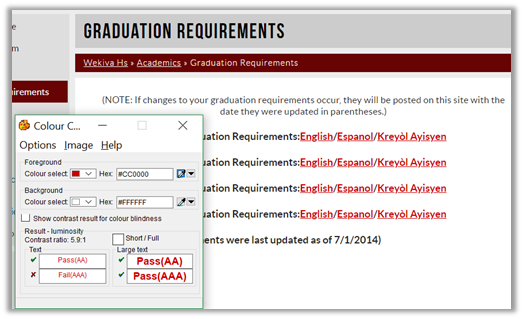
Here is an example of one page where this error may not be a real error:
Black text on a white background is a 21.0:1 contrast ratio.
Red text on a white background is a 5.9:1 contrast ratio.
-
Provide sufficient contrast between text and background colours (17,531 pages)
If you have not changed the default text color (or copy and pasted text from other sources where the text and/or background may have been in a different color) you can ignore this error. If you have changed colors, use Colour Contrast Analyzer to check that the ratio is 4.5:1 or better (see blog post on Color Contrast).
Level AA – General Content Related Errors:
-
Use the blockquote element to mark-up block quotations (17,548 pages).
Unless you have specifically added blockquote elements on your page, ignore this error
-
Repeated components appear in the same relative order each time they appear (17,548 pages).
Ignore this error for now until we get further clarification.
-
Words and phrases not in the document’s primary language are marked (17,548 pages).
This is the result of mixing language on the same page instead of using separate pages or using the Language dropdown option to display the page in a different language. Unless marked, you should not mix languages on a page.
-
Sites must have a site map (17,548 pages).
Ignore this error for now until we get further clarification
-
I (italic) element is not used (17,522 pages).
Believed to be a SchoolMessenger problem in general, but check your content to insure that you did not use <i> tags to created italic text rather than <em>.